As we move our lectures online due to COVID-19, I’ve been surprised to find that online lectures are much better if they are live, with students participating in real time, rather than pre-recorded. Live lectures are more fun to give, allow natural interaction and a sense of community, provide structure for students at home, and even open up some neat new interaction possibilities. Of course we also record these lectures so that students who can’t make the lecture time can still watch later.
I’m currently co-teaching Introductory Dynamics (TAM 212) with Elif and we are using Zoom to deliver live lectures. We have about 150 students attend each lecture, which is 1/3 of the total enrollment. We post lecture slide skeletons (slides with some parts missing) in advance, and during lecture we share our iPad and handwrite the missing parts of the content.
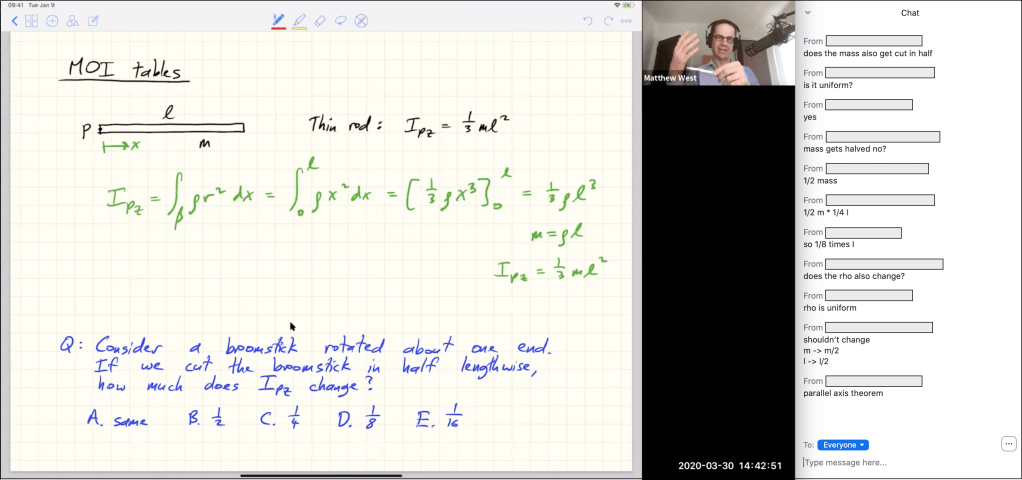
Chat is the key to interaction
During lecture we have all students mute their audio and video, but we strongly encourage them to interact with us over text chat. It took me a little while to get the hang of reading the chat window while lecturing, but now I love the fact that there is a stream of questions, reactions, and discussion going past all the time. I can respond in real time to an interesting question or repeat a good comment from a student. It’s also great way for me to ask open-ended questions and have lots of students respond with their thoughts. Having a co-instructor or teaching assistant in the session can be helpful to manage chat, especially the first few times, but it isn’t required.
Using chat like this is actually better for interaction than teaching in person in a large lecture theater. In-person questions or comments are very slow, requiring the whole raise-hand/call-on-student/ask-question cycle. It’s so much faster for me to see a question go by in chat and just immediately react to it. Many times, simple questions are answered by other students and I choose to let them go past without comment. I’m so happy with this new format that I will be exploring ways of using chat during in-person lectures, once we are back on campus.
Live lectures provide community and structure
Being able to interact with students directly not only makes me feel more connected with the class, but after every lecture we have students thanking us for doing the lectures live with them. The situation during COVID-19 is very different than online courses during normal times, and students who are stuck at home are missing their normal sense of community and the daily structure of lectures and labs. As one student posted on the class Piazza forum:
I just wanted to take a moment and thank the instructors for providing interactive lectures during this difficult time. All of my other classes just post a pre-recorded video and it’s kinda depressing. It may not seem like much, but having the live, interactive lectures have really helped me focus better and not feel so lonely right now. Plus I always enjoy the surprise appearances by Midnight and Oasis 🙂
— Anonymous student in Introductory Dynamics, quoted with permission. Midnight and Oasis are Elif’s and my cats, who make frequent appearances during lectures.
While live lectures can only provide a small replacement for the normal on-campus experience, they give a greater sense of personal connection than watching a professor dictate the lecture into a camera. It’s almost impossible for me to be engaging and enthusiastic when talking by myself to a microphone. I like co-teaching with Elif, but it’s actually the student chat interaction that’s key and this also works with just one professor.
Technology considerations
A tablet is essential. I personally love my iPad Pro (12.9″ with Apple Pencil 2) connected via a USB-C cable to my MacBook, and Zoom lets me share the iPad screen. Zoom also allows wireless iPad screenshare. I use the laptop camera and an external microphone, but the built-in mic also works fine.
Zoom is a great platform that’s easy to use for students and provides the basic functionality for online lecturing (screenshare, tablet-share, polls, chat window, recording). Lucas uses Twitch, which allows more control over the screen setup and has other advanced features, but also has a steeper learning curve.
I use iClickers for in-person lectures and, while Zoom polls allow the same question-answering experience, I don’t know how to capture the “pair” part of think-pair-share activities in large online lectures. Nicole uses Zoom breakout rooms in a 30-student class to have students work on exercises in groups, but I haven’t succeeded in using breakouts for short paired discussions in a larger class.
 Education at Scale
One thought on “Online lectures should be live”